
Download Smart Pension – Free Retirement Planning & Investment Tool for Android
Overview
Smart Pension is a free mobile application designed for Android users seeking to take greater control over their retirement planning and pension investments. Developed by Smart Pension Limited, the app serves as a digital gateway to key pension-related information and investment options, including tax-saving fixed income, tax-free income, annuities, and unit trusts. It is tailored for employees who want to better understand their pension schemes and make informed decisions based on their personal financial goals and circumstances.
The app enables users to explore various investment types, assess their benefits, and gain clarity on how different pension structures function. This level of transparency supports users in determining the ideal contribution amount and selecting investment strategies aligned with long-term financial objectives. While the app does not facilitate direct investment transactions, it provides educational and informational content to empower users with knowledge.
Smart Pension is particularly useful for individuals navigating employer-sponsored pension plans, especially those who are new to retirement planning or seeking to optimize their current arrangements. It functions as a supplementary tool to help users stay informed and engaged with their pension savings, offering a convenient way to access critical financial data on the go.
Key Features & Capabilities
- Investment Type Overview – Provides detailed insights into various pension investment vehicles, including tax-saving fixed income, tax-free income, annuities, and unit trusts, helping users understand the unique benefits and risks of each.
- Personalized Financial Guidance – Offers information tailored to individual financial situations, enabling users to evaluate investment options based on their personal goals and risk tolerance.
- Pension Scheme Information – Explains how different pension schemes operate, including contribution structures, payout methods, and eligibility criteria, promoting greater transparency.
- Contribution Planning Tools – Supports users in determining the appropriate amount to invest by offering guidance based on personal financial circumstances and long-term objectives.
- Accessibility & Convenience – Designed for mobile use, allowing users to access pension data and educational content anytime, anywhere through their Android devices.
These features are especially beneficial for employees who want to stay informed about their pension options without needing in-depth financial expertise. The app serves as a self-education platform, helping users understand complex financial concepts in an accessible format. By centralizing information about investment types and pension mechanics, it reduces information asymmetry and encourages proactive financial decision-making.
User Interface, Workflow & Performance
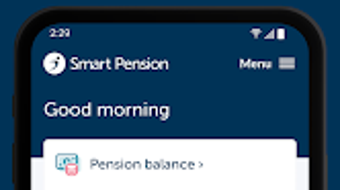
The user interface of Smart Pension is designed with simplicity and clarity in mind, prioritizing easy navigation for users of varying financial literacy levels. The app employs a clean layout with intuitive menu structures, allowing users to quickly access sections such as investment types, scheme details, and contribution guidance. Information is presented in digestible formats, including text summaries, icons, and step-by-step explanations.
Workflow efficiency is enhanced through logical content grouping and minimal user input requirements. Users can browse investment options, read descriptions, and compare features without needing to input personal financial data. The app does not require account login or data synchronization, which simplifies access and reduces friction.
The developer did not specify resource usage details. Performance observations are based on general software behavior patterns. The app is expected to operate smoothly on modern Android devices, given its size of 41.1MB and the absence of complex processing demands. Stability is likely maintained through standard app development practices, though no official benchmarks or crash reports were provided.
Compatibility & System Requirements
Smart Pension is available exclusively for Android devices. The current version is 3.1.1, with a file size of 41.1MB. It is designed to run on Android operating systems, though the specific minimum OS version was not listed by the developer.
Compatibility information was partially provided. The developer did not specify exact system requirements, including RAM, CPU, or storage needs beyond the app’s installation size. Users should ensure their device meets general Android compatibility standards for apps of this nature. No information was provided regarding support for tablets or other form factors.
Pros and Cons
Pros
- Free to download and use, with no hidden costs
- Provides clear, accessible information on complex pension investment types
- Designed for employees managing employer-sponsored pension plans
- Mobile-first approach allows on-the-go access to retirement planning data
- Focuses on education and informed decision-making rather than transactional features
Cons
- Does not support direct investment or contribution changes within the app
- Limited to Android platform; no version available for iOS or desktop
- Exact system requirements and compatibility details were not specified
- Offers no interactive tools such as calculators or simulations
- Relies on external pension providers for actual investment management
FAQ Section
Is Smart Pension available for iOS devices?
As of now, Smart Pension is only available for Android. No version has been released for iOS or other platforms.
Can I make investment changes through the app?
No, the app does not allow users to modify contributions or make investment selections. It provides information and guidance but does not facilitate direct investment actions.
Is the app secure and safe to use?
Smart Pension is developed by Smart Pension Limited, a registered financial services provider. The app does not collect personal financial data, and no login or account creation is required, which minimizes data exposure risks.
How often are updates released?
Updates are released periodically to improve functionality and ensure compatibility with new Android versions. The latest version available is 3.1.1, released on April 9, 2024.
Do I need an internet connection to use the app?
Yes, an internet connection is required to access the app’s content, as all information is delivered dynamically and not stored locally.
Final Thoughts
Smart Pension stands out as a valuable, free tool for Android users interested in gaining clarity on pension investment options. While it does not enable direct transactions or account management, its focus on education and transparency makes it a strong companion for individuals navigating retirement planning. The app’s clean interface, accessible content, and mobile accessibility contribute to a positive user experience, particularly for those seeking to understand tax-efficient investment vehicles like fixed income and unit trusts.
Its limitations—such as lack of platform diversity and absence of interactive tools—are balanced by its simplicity and clear purpose. For employees who want to take a more informed approach to their pension savings, Smart Pension offers a reliable source of information without the complexity of full financial platforms.
Download Smart Pension now to take control of your retirement planning with confidence.







